
Technical Details
The design of SnapClip: hands-on soft clipping with the graph and ADAA anti-aliasing
SnapClip was designed to move clipper adjustment from "finding it by ear and guesswork" closer to "aiming with your eyes and finishing with your ears." This article explains the design of the technical pillars of SnapClip: the Soft Knee curve, Snap Adjust, Threshold, ADAA anti-aliasing, and the Dry/Wet mix.
Operate the bend point directly
The handle on the SnapClip graph represents the start of the Soft Knee curve. Threshold sets the input level where the curve begins to bend, and Saturation determines the depth of the knee — on the graph it lifts the start of the curve along the Y axis. The handle's xy coordinates are (Threshold, Threshold + Saturation).
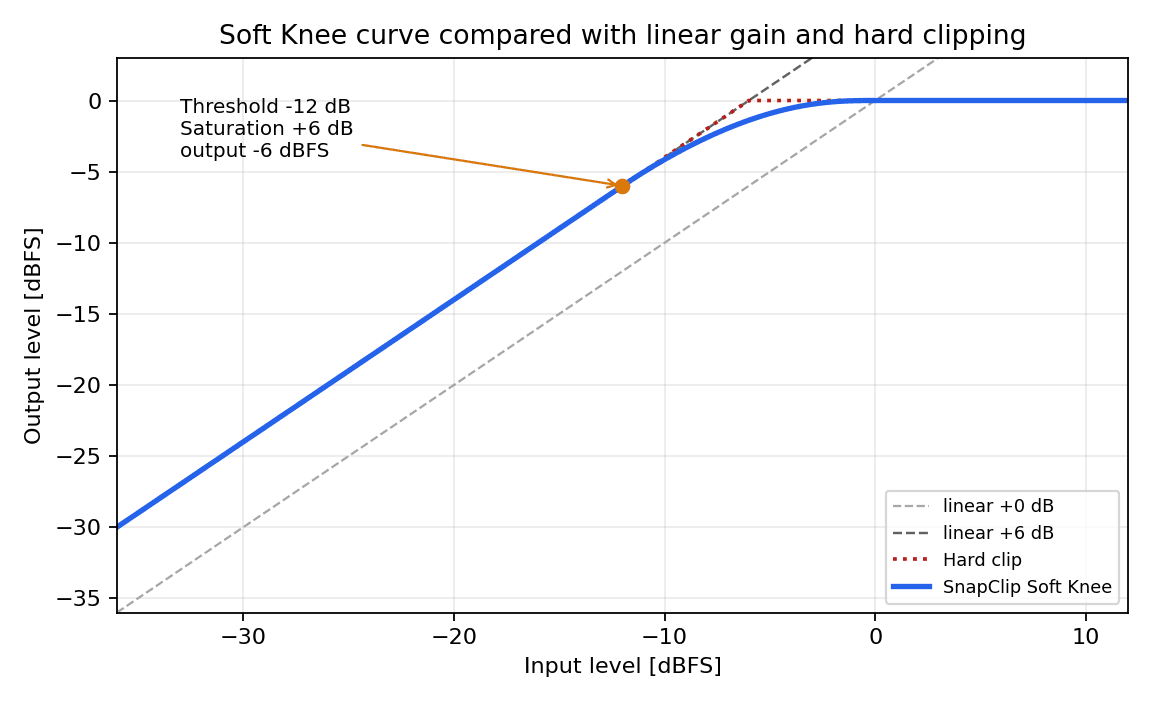
Conceptual diagram of the start of the Soft Knee curve.
Signals below the bend point are simply lifted linearly by the Saturation amount, so no new harmonic distortion is generated.
Harmonics (saturation) are added only to peak components that exceed the Threshold.
Mechanical pre-setup with Snap Adjust
Press the Snap button and Snap Adjust back-calculates and sets Input Gain, Saturation, and Threshold from the most recent 4 seconds of input peak history and the target reduction amount. It is not AI or auto-mixing; it mathematically completes the pre-setup from the input history.
The target reduction level can be selected from the menu next to the Snap button. If left unspecified, the target GR described in the currently selected preset is used.
No distortion is added below the threshold
SnapClip is designed to avoid unintended tonal changes and to control only the peaks with precision. For input signals below the Threshold, the algorithm only raises the gain and adds neither distortion nor harmonics.
The figure below is the output spectrogram when a sine wave is fed into SnapClip. The top row corresponds to amplitudes below the Threshold, and the bottom row to amplitudes above it. In the bottom row you can see harmonics being added to the signal that exceeds the Threshold.
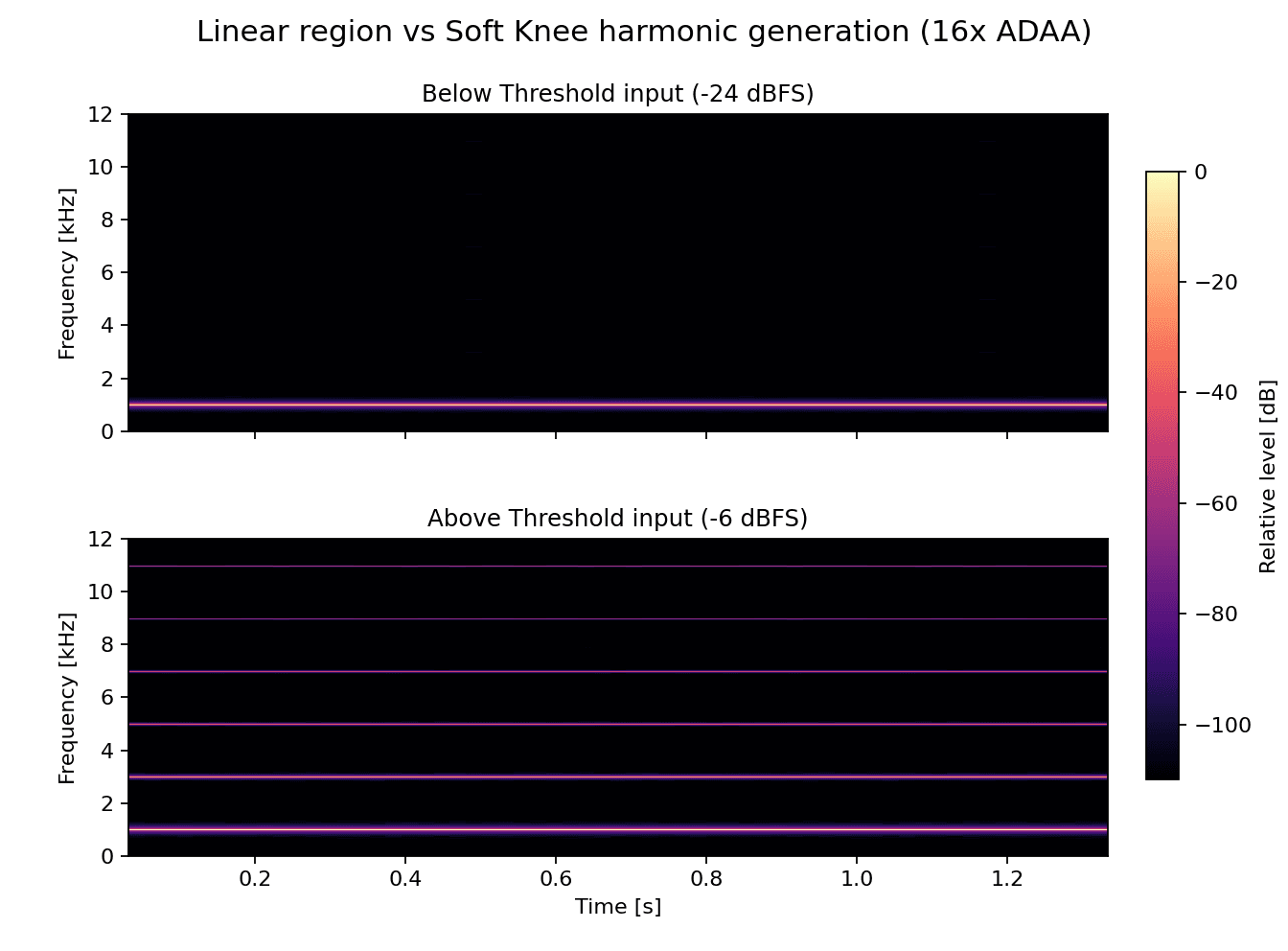
Input: ~1 kHz sine (top: -24 dBFS, bottom: -6 dBFS)
Parameters: 16x ADAA / Threshold -12 dB / Saturation +6 dB / Input Gain 0 dB
Suppressing aliasing noise by combining ADAA with oversampling
Clipping is a nonlinear process and produces high-order harmonics that do not exist in the input. When those harmonics exceed half the sample rate (Nyquist frequency), they fold back as aliasing noise into the audible band. SnapClip combines oversampling with ADAA (Antiderivative Anti-Aliasing) to efficiently reduce this fold-back.
To verify the effect of ADAA under the harshest conditions, we set SnapClip's algorithm to hard clip and measured the response to a sine sweep input.
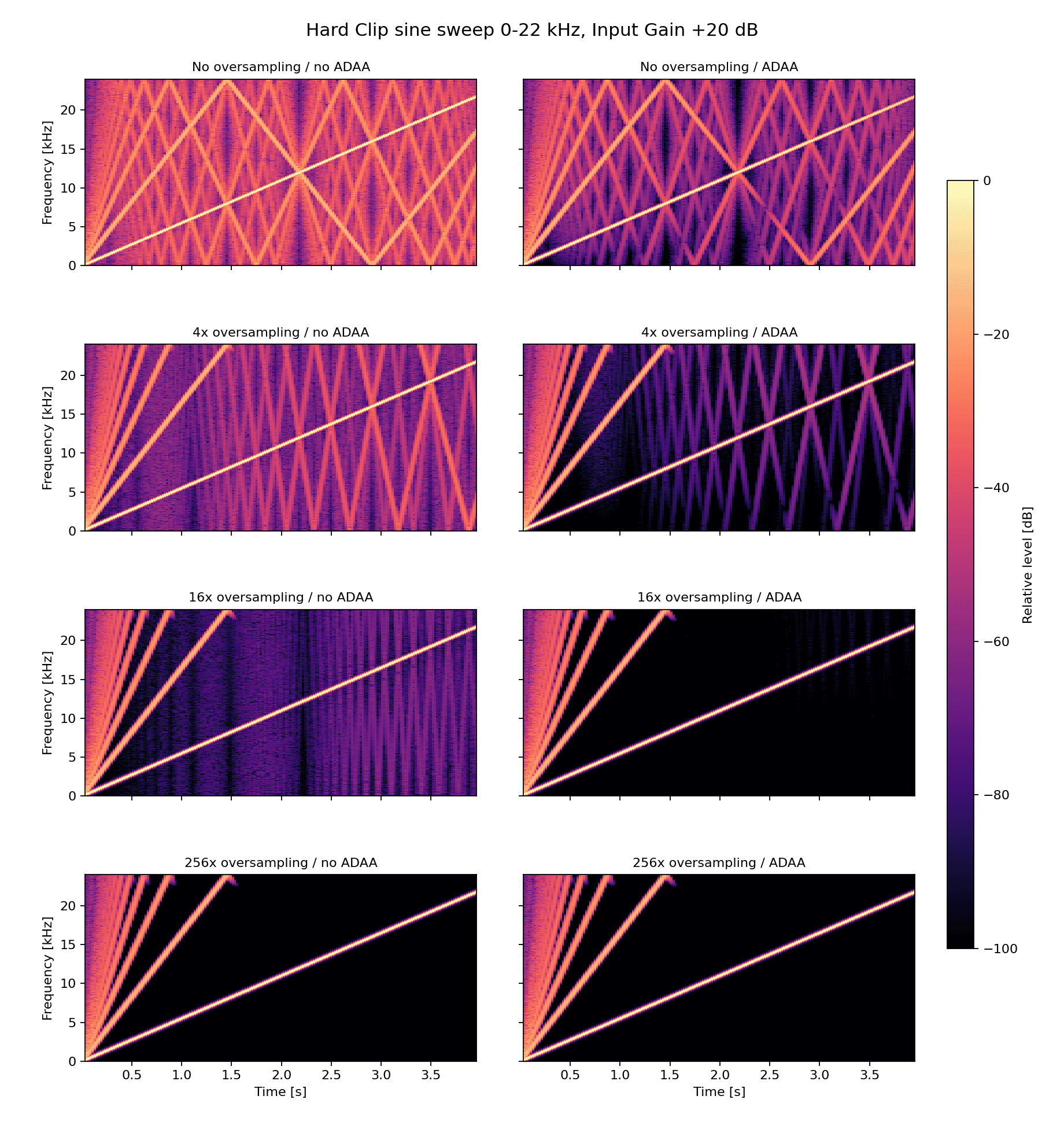
Input: 0–22 kHz linear sine sweep with 0.0 dBFS peak
Parameters: Input Gain +20 dB / Threshold 0 dB / Saturation 0 dB
The left column shows the result without ADAA, and the right column shows the result with ADAA.
In the left column the harmonics produced by clipping fold back at the top of the spectrogram, and the whole image looks bright.
Some fold-back noise also remains in the right column, but the overall image is darker and the original sine wave and its harmonics stand out clearly.
The result with 16x oversampling combined with ADAA is close to that of 256x oversampling, suggesting sufficient noise reduction is achieved.
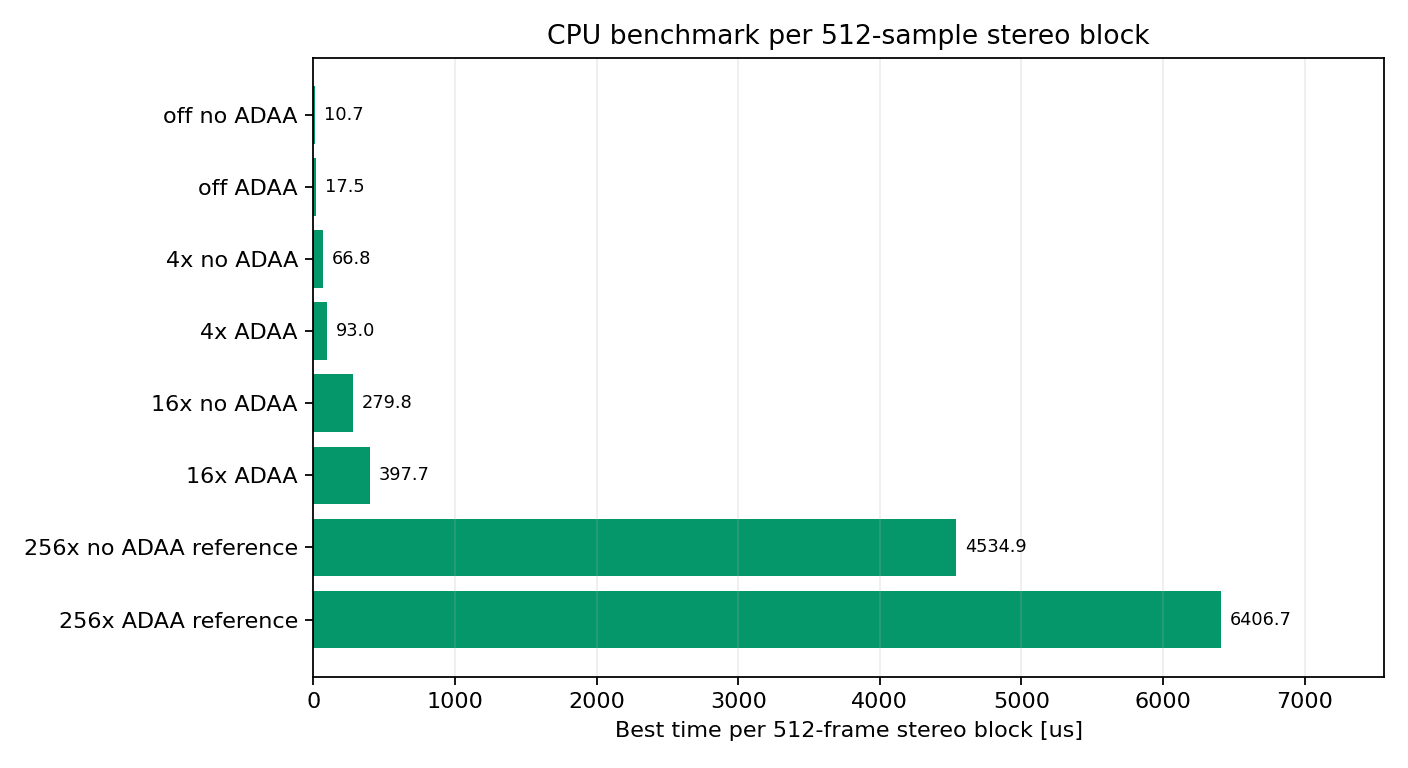
Measured CPU benchmark of SnapClip's overall audio processing.
512 samples / stereo processing was run multiple times on the same machine, taking the shortest value.
In the CPU benchmark, 16x ADAA was about 90% faster than 256x oversampling. By combining the oversampling factor with ADAA, the design keeps high-quality noise reduction within practical processing load.
Why Dry/Wet does not thin out the sound
In processing that uses oversampling, the Wet side passes through filters. If only the Dry side is passed through completely unprocessed and mixed at 50%, a phase difference can arise between the Wet and Dry signals, which can cause comb-filter-like cancellation. This cancellation can lead to a swooshy modulation in the high end, a thin sound that lacks clarity, and other issues.
SnapClip routes the Dry signal through the same oversampling path as the Wet signal, suppressing phase differences in parallel mixing.
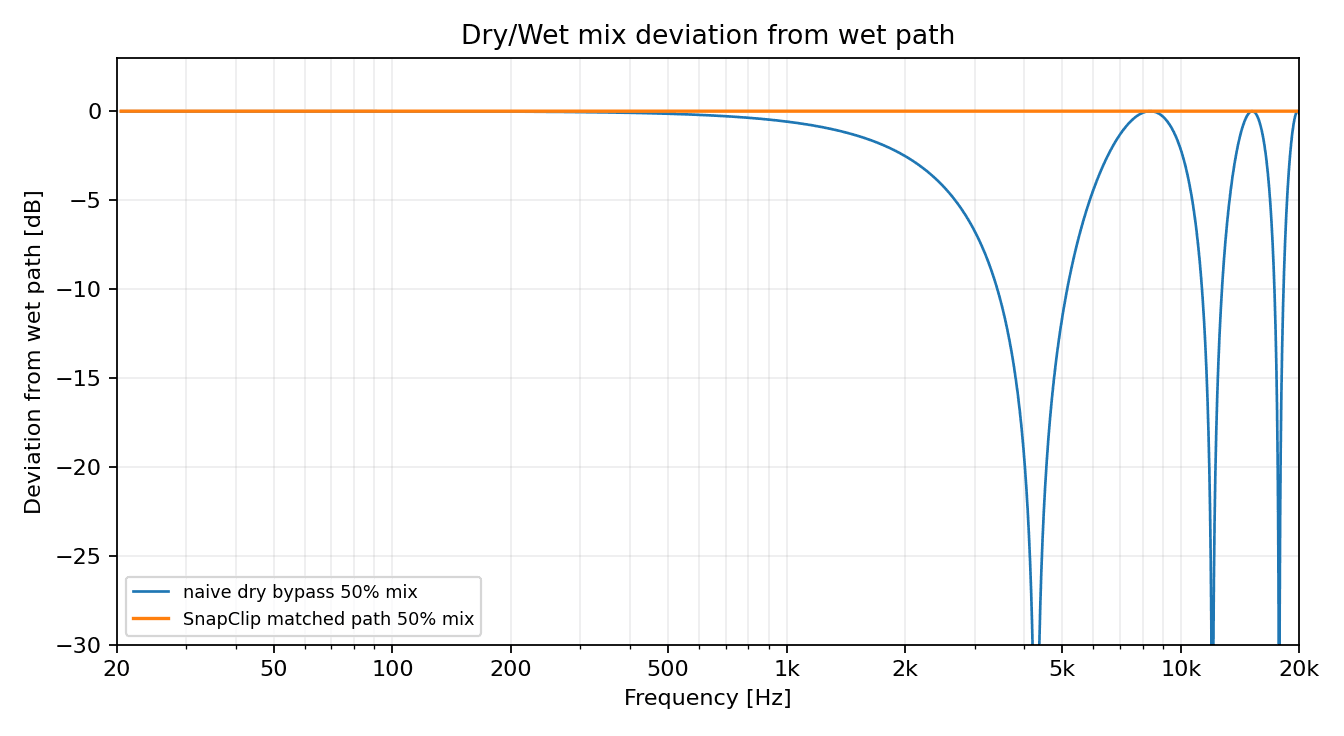
Comparison of frequency responses when the Dry signal is mixed in directly versus when the Dry signal is also routed through the same oversampling path.
A 1-sample impulse is passed through SnapClip's internal oversampling processing and the output response is analyzed by FFT.
When the Dry signal is mixed in directly, cancellation of more than 20 dB occurs at certain frequencies. With SnapClip's Dry/Wet, however, the Dry signal also passes through the same processing path, so this cancellation is not observed.
Summary
SnapClip is a clipper plugin that combines intuitive graph-based control with efficient setup via Snap Adjust.
The DSP design pays attention to the following points, and we have verified their effects through measurement.
- Signals below the Threshold are only level-changed; harmonic addition is suppressed sufficiently
- Low-load, high-quality anti-aliasing through ADAA
- Suppressing path-difference cancellation during Dry/Wet mixing