A. Clipper only
Hip-Hop / EDM / Drum BusMaster track
EQ↓SnapClip Pro
The clipper sits last on the master. It delivers a powerful sound while keeping the punch of the original mix. Ideal for music driven by beats and groove.

SnapClip Pro refines the transparent clipping of SnapClip, already used by more than 20,000 producers, and adds Inflate: a legendary loudness enhancer born from a British digital console that brings density and presence.
Both control peaks to raise loudness, but they work differently, and that difference shapes how your track ends up sounding.
Master track
The clipper sits last on the master. It delivers a powerful sound while keeping the punch of the original mix. Ideal for music driven by beats and groove.
Master track
Balanced peak control that clips before the limiter. It keeps the limiter from flattening the attack, balancing the original tone and punch. Ideal for band sounds and music centered on acoustic instruments.
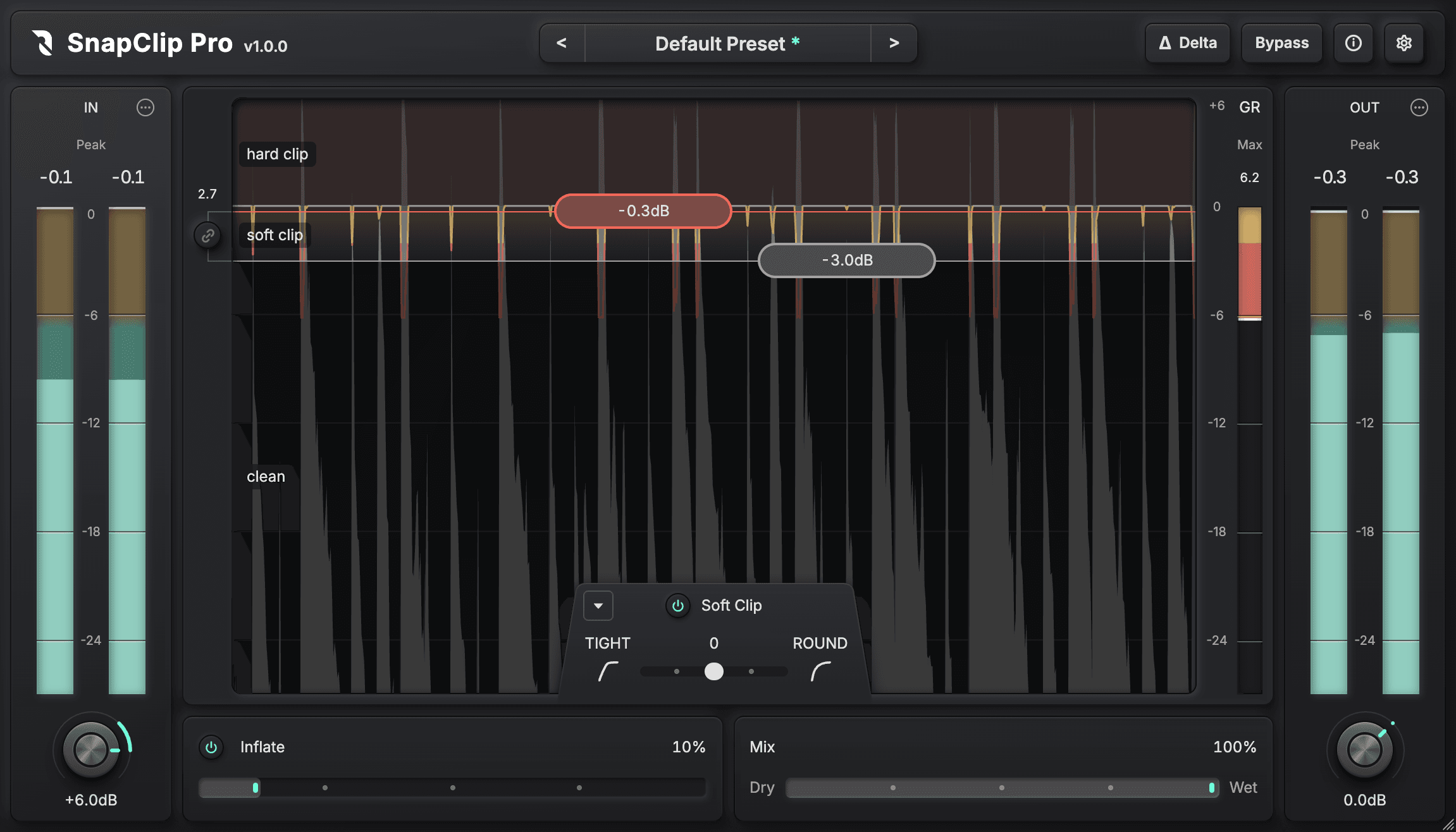
Two thresholds on the large waveform view let you set three zones visually: hard clip, soft clip and clean.
Audio passing through the clean zone at the bottom keeps the original signal exactly, without a single bit of change (in Linear Phase mode).
Careful DSP design and meticulous implementation deliver extremely transparent, accurate clipping.
SnapClip Pro integrates the algorithm of Inflate, a legendary loudness enhancer born from a British digital console. It naturally lifts density and RMS and adds harmonics.
Because it keeps the peak ceiling you set for clipping, it adds presence without raising the peaks.
SnapClip Pro's Inflate also supports modern anti-aliasing such as oversampling and ADAA, adding density more cleanly than the original implementation. Turn oversampling and ADAA off for a classic texture.
Up to 64x oversampling, plus ADAA (Anti-Derivative Antialiasing), which drastically reduces aliasing noise.
Switch between Linear Phase mode with no phase rotation and Minimum Phase mode with near-zero latency, for the right processing in everything from mastering to beat making.
Bypass with Loudness Match lets you compare only the change in tone, without being fooled by loudness differences.
Delta listening lets you monitor only the peaks that were shaved off, so you can fine-tune by ear.
Alongside Peak / RMS meters, it includes the LUFS meter and gain reduction meter essential for mastering.
Right-click Output Gain to instantly match a target LUFS or the input loudness.
Use the two handles on the waveform to set the hard clip, soft clip and clean zones. The amount actually clipped is shown as red and yellow lines along the top of the waveform.
Press the Delta button to hear only the part that was clipped off. If you can clearly hear the instruments, you are clipping too much.
Inflate adds density, harmonics and presence.
Press the Bypass button to compare the tone with the original at the same loudness. Adjust Inflate while you listen.
Player controls
The main style: SnapClip Pro alone as the final stage on the master. Use Loudness match to hear how transparently it handles peaks without dulling sharp attacks, and Peak normalized to check how much louder the mix gets. Ideal for modern pop, hip-hop, electronic music and any track where punch and power should come first.
Electronic.wav
0:00 / 0:00Balanced peak control, with SnapClip inserted right before the limiter. The SnapClip Off audio already has the limiter on it, so both versions are fairly loud. Listen for how the drum hits and the groove come forward more clearly when you turn SnapClip on. Ideal for pop, rock, anime songs and any track where the instruments' natural nuance and sense of space matter.
Funk Session.wav
0:00 / 0:00Shaving off only the peaks, without killing the transients (the force of the attack), creates a punchy beat that comes forward. Inflate then adds density and presence for a thick, full sound.
Acoustic Drums.wav
0:00 / 0:00Combining soft clipping with Inflate adds density and harmonics. The peaks stay where they are, and the part gains solid presence and body that won't get buried in the mix.
Electric Bass.wav
0:00 / 0:00The average of all 25 beta testers who allowed us to publish their review.
OSx4で驚くほどCPU負荷が軽い。いつもの使い方「音が壊れるまで下げてから壊れないとこまで戻す」という使い方をすると削りすぎになるくらい綺麗。インフレーターが100%にしてもどっしり太い。GRメーターが見やすい。Love the clean layout & very easy to understand meters & visualsIt cuts peaks while preserving texture and avoiding degradation better than any other clipper I own. The soft clip allows for finer adjustments than StandardClip.操作が直観的でわかりやすい。
各ボタンに日本語の説明があるため、何をどう弄れば良いか迷わない。
プリセットが豊富。ソースに合わせてプリセットを選んであとは微調整するだけで満足いく仕上がりになる。軽くてとても使いやすいです。ピークのチクチクをガンガン刈り取っても音が壊れないのが最高です!Despite the fact that a clipper is a simple device and that there are many clipper plugins, there are very few truly good ones. And this clipper is one of those good clipers. Mainly thanks to the ability to set a "lookahead" style function (limiter in strict celling) to get crimp and warm sound without excessive distortion and grit. Combined with the inflate knob (which sounds similar to a famous inflator) this clipper sounds really cool on drums, bass, and the master bus (without using a subsequent limiter). The result is a punchy, sharp, and noble sound. In hard clipper mode it works well in parallel with drums and on synthesizers. Also, by simultaneously using hard/soft clip and inflate, you can restore the presence effect to the vocals and bring them closer to the listener on the virtual stage. It’s also nice that there’s a delta mod and automatic volume adjustment. The preseta are unremarkable, but I liked that all the main knobs are located right in the window with the opened preset, so you can quickly adjust it to suit your needs. Overall, it’s a very good clipper — I’ve definitely added it to my collection.Survey respondents received a discount coupon for the full version, regardless of their rating.
Your SnapClip Pro license key also activates SnapClip Standard. We recommend SnapClip Pro for detailed work on buses and the master, and SnapClip Standard for inserting on many tracks with zero latency.
Main window
Recommended use
Mastering, buses, multi-mic sources
Track inserts, live and recording
Latency (48 kHz)
Linear phase: 0–86 samples Minimum phase: 0–30 samples
0 samples
Max oversampling
64x
16x
Phase mode
Linear phase / Minimum phase
Minimum phase
Bit-exact clean zone
✓ (linear phase only)
—
Loudness enhancer (Inflate)
✓
—
Loudness match / Delta
✓
—
Loudness meter
✓
—
Automatic parameter adjustment
Input gain and output gain
Snap Adjust
| SnapClip Pro | SnapClip Standard | |
|---|---|---|
| Main window | ||
| Recommended use | Mastering, buses, multi-mic sources | Track inserts, live and recording |
| Latency (48 kHz) | Linear phase: 0–86 samples Minimum phase: 0–30 samples | 0 samples |
| Max oversampling | 64x | 16x |
| Phase mode | Linear phase / Minimum phase | Minimum phase |
| Bit-exact clean zone | ✓ (linear phase only) | — |
| Loudness enhancer (Inflate) | ✓ | — |
| Loudness match / Delta | ✓ | — |
| Loudness meter | ✓ | — |
| Automatic parameter adjustment | Input gain and output gain | Snap Adjust |
SnapClip Standard is also sold on its own ($15.20). Buy SnapClip Standard
Launch price until Nov 30
The same license key also activates SnapClip Standard.
macOS 12+ VST3 / AU / AAX (Apple Silicon Native)
Windows 11 VST3